World Forge Part 3
More World Forge work this week! It's going well I think, as I seem to be ticking whatever boxes I add into the relevant todo list. I think this "World Forge" arc is going well because the scope is far more contained, I can reuse a lot of code, and it feels quite a bit more self-contained. While I was originally thinking I might share that in August, it now looks more like ... March? May the latest I guess. Depending on Steam admin stuff that I've never dealt with. Before I even push it on Steam, I'll probably share it more informally for an earlier round of feedback. Anyway, here are the associated updates:
World Forge
- Saving state. My approach to saving the game is basically dump all the game state. Since this game mode works within the confines of the game state, it's ... the same format and data basically. This means that the save data are slightly larger than necessary, but simplicity wins, as I don't have to implement anything else. But of course, the end user needs a GUI to do save/load. I repurposed the existing "Continue"/"Load" screen, to be a bit more context-sensitive in terms of game mode, and pick appropriate saves (even if the data structure is the same, the world forge savedata cannot be loaded from the main game). This also meant that I have to be a bit more organised (gasp!) with regards to the save folder. So, to clean things up, I'm now putting the saves appropriately in the application's user data (where I should) in appropriate subdirectories. So that was feature and refactor all at once, good!
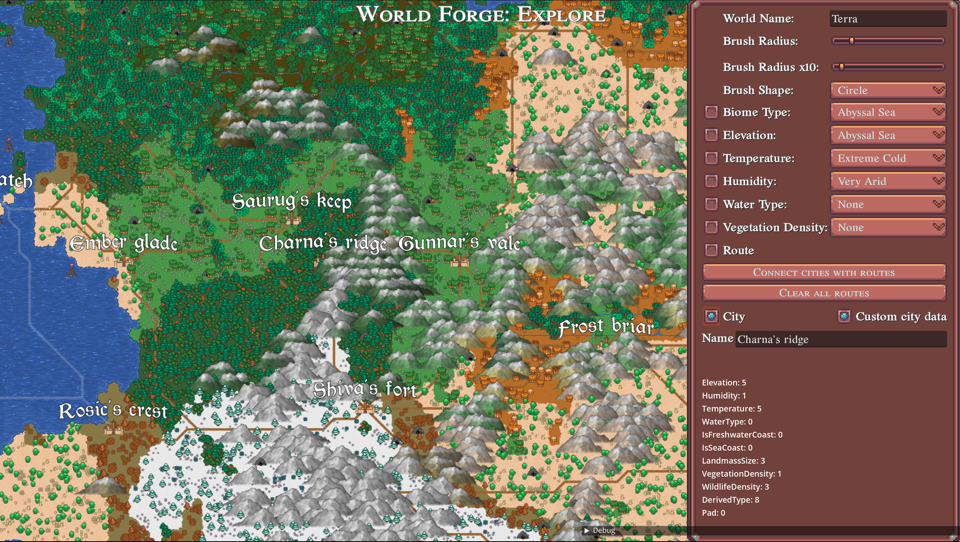
- Fonts and city names. Another refactor that benefits the main game. I've been using an MSDF implementation to display in-game text (damage numbers, text bubbles above characters, etc) which has nothing to do with Godot's nodes. Something was buggy there because the text did not look great. So I went into a mini rabbit hole to fix it. The use case is to be able to display city names in the overworld, when holding a button down, this happens on top of highlighting "objects". Now you should get cities highlighted and the names displayed above them, which is neat. But it looked terrible. Long story short, the problem was a mix of low-resolution textures, a couple bugs in shader code, a couple issues with the texture atlas generation process, and some issues with me trying to over-compress glyph data. Currently it looks much better, so all good in that department too. To top things off, as I was messing around I realised that it looks cool (does it?) to make the city names slightly arched.
- City properties. You can now add/remove arbitrary city properties. This is a feature exclusively for World Forge and export of maps that can be used basically in any context. I'm not going to dictate what are a cities properties basically, here's a dictionary, figure out the keys and values yourselves!
- Mega map export. I guess I keep coming back to that functionality because I like BIG MAPS (I've even managed to work on something like that professionally for a while). Basically, you can now press a button and a camera will patiently move around and render a perfect grid of rectangles that cover the entire world map, at some zoom level I deemed ok. This happens in-game. Then, currently, the images are stitched into a big image, in this case it's a 250MB png file, at about 16kx16k resolution. And for the fun of it, there are some online platforms such as zoomhub.net that allow you to upload huge images and pan/zoom them, which I did. Here's an example map
- JSON export. This is just to democratise the data a bit - I added a button to export the map in JSON. Because the result is agnostic of the data structures and is supposed to be easy to parse, it's a big file (~80MB), but at least someone fluent in JSON can parse the biome data for each tile and city properties and locations too. I'm not planning to do anything else with it, unless requested by a bunch of people, which of course is not happening anytime soon.
Other
- Steam update. Added a new update on the Steam page, basically it's a digest of the last few months.
- 5-minute ability icons. I finally completed my quest for quick-and-dirty icon design using a tablet, 2 brushes and lots of patience.After all was said and done, I completed 84 icons. I made them in a 1024x1024 canvas, and the plan is to eventually make some (pixel-art?) icons out of them, maybe at 64x64 resolution. That process of course would be a lot longer, and I want to try out some pixelation software that I have, to see if it can at least give me a starting point. In any case, the goal was that, for every new ability I come up with and integrate, I can spend 5 minutes to make a probably bad but consistent icon, that definitely looks placeholder and ideally communicates what the ability is about. Not sharing those yet xD
That's all for now, have a nice weekend!